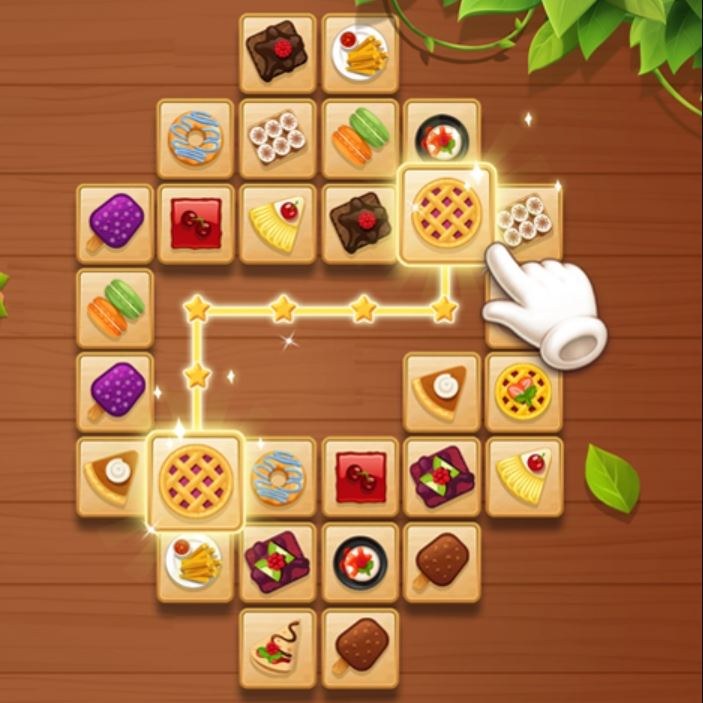
Tile Connect Classic is a deceptively tricky tile-matching puzzle where you connect identical pairs using a path with no more than two bends. It suits players who enjoy calm, logic-driven games like Sudoku or jigsaw puzzles, but not those seeking flashy rewards or constant action.
I opened Tile Connect Classic expecting something relaxing, and for the first thirty seconds it is. You're looking at a grid of painted tiles—flowers, fruits, little emoji-ish faces—and the rule is dead simple: find two identical tiles that can be connected with a line that bends no more than twice, tap them, and they vanish. The first few pairs disappear with a soft pop, and you feel clever. Then the board starts to thin out, and somewhere around the one-minute mark I realized I had painted myself into a corner with no legal moves left. That's the real game.
The loop isn't matching—it's pathfinding under pressure
On the surface this is a matching game, but what you're actually doing is scanning a crowded board and running a quick mental pathfinding check on every visible pair. Can I draw a clean line between these two lotus tiles without crossing other tiles? The line can go straight, turn once, or turn twice. Three or more bends and it's illegal. The game won't let you cheat it. If you try to tap a pair that can't be connected within those constraints, nothing happens. No error buzz on most versions, just silence, which is somehow worse because it makes you doubt your own eyes.
The tiles aren't randomly scattered either. They're stacked or layered in a way that hides some pieces partially behind others. You can only match tiles that are "open"—meaning no other tile is sitting on top of them and at least one side is free. This is where the classic mahjong-solitaire DNA shows up. You're not just clearing a flat picture; you're peeling back layers, and the tile you desperately need is often buried under two other pairs you haven't figured out how to reach yet.
What you're actually optimizing for
If you play casually, you'll just grab the first visible pair and hope for the best. That works for about forty seconds. To go deeper, you have to shift your thinking from "what can I match right now" to "what opens up if I match this instead." Every pair you remove changes the board geometry. Tiles that were blocked suddenly become available. Tiles that had three open neighbors might now have none. The skill is in reading three or four moves ahead and recognizing which pairs are "safe" to clear and which ones are trapdoors.
There's usually a timer ticking, though it's not always aggressive. In Tile Connect Classic the countdown bar at the top acts more like a gentle cattle prod than a panic button. You have maybe three to five minutes per board depending on the level, and if you're moving steadily you'll finish with time to spare. The clock punishes indecision, not speed. I found myself losing more time to staring paralysis than to actual slow tapping. The game also sometimes throws in a shuffle power-up or a hint button—use the hint sparingly, because it has a cooldown and you'll want it when the board is down to eight tiles and none of them seem to line up.
Mistakes that end runs embarrassingly early
The most common blunder I made in my first few sessions was matching the most obvious pair immediately without checking what it would strand. Two cherry tiles sitting right next to each other on the edge look like a gift, but if they're the only thing keeping a column of blocked tiles accessible from one side, removing them can seal off half the board. I did this twice before I learned to squint at the neighbors first.
Another trap: fixating on one tile type. You'll spot a lotus tile you want to free, and you'll start hunting for its partner while ignoring three other perfectly good pairs that are about to get buried by the timer. Tunnel vision kills runs. The board doesn't care about your plan. It's constantly changing, and the pair you were saving for later might get blocked by a cascade you didn't expect.
Lastly, misunderstanding the "open" rule. A tile needs to have no tile overlapping it and at least one side—left or right—completely unobstructed. I kept trying to grab tiles that had clear tops but were sandwiched on both sides, and the game just stared back at me. If you're coming from standard match-3 games, this feels unintuitive at first. You're not just looking for identical images; you're looking for identical images that are physically reachable along a clean path, and that path has to obey the two-bend limit.
Phone versus desktop: the controls change how you think
I played Tile Connect Classic on both my phone and a laptop, and the experience splits in interesting ways. On mobile, tapping tiles with your thumb feels fast and direct. You can almost drumroll through easy pairs, and the touch feedback makes the game feel twitchy in a satisfying way. The downside is that on smaller screens, tiles get cramped. If you have average-sized adult fingers, you will occasionally tap the wrong tile and waste a precious second. I mis-tapped enough times that I started using my index finger instead of my thumb on denser boards.
On desktop with a mouse, precision goes way up. You can hover over a tile and see the subtle highlight that confirms it's selectable before you click. The cursor also makes it easier to trace the connection line in your head because you can physically move the pointer along the path to check for obstacles. But mouse play feels slower. There's a tiny drag between thought and click that doesn't exist with direct touch. I found my desktop scores were cleaner but my mobile scores were faster, and the game seems to reward speed slightly more than accuracy in the long run.
Fullscreen mode on desktop is worth enabling if your browser supports it. The tiles scale up nicely, and the reduced visual clutter from browser tabs and bookmarks genuinely helps with scanning. On mobile, I'd recommend locking your screen orientation to portrait or landscape depending on which way the game was designed—Tile Connect Classic seems built for portrait, and flipping it sideways sometimes crops the edges awkwardly.
Who should actually play this, and who should skip
This game is for people who like visual puzzles that feel more like untangling a knot than blasting through obstacles. If you enjoy the quiet logic of Sudoku or the spatial unwinding of a jigsaw puzzle, Tile Connect Classic scratches a similar itch. It's not flashy. The tile art is pleasant but not memorable, the sound effects are minimal, and there's no storyline. The satisfaction comes entirely from clearing a board that looked impossible two minutes ago.
If you're someone who needs constant dopamine hits—explosions, combos, level-up fanfares—this probably isn't your game. The rewards are subtle. A board clear gives you a quiet victory screen and a new layout. That's it. There's no currency system to grind, no characters to collect, no daily login bonus that I could find. It's refreshingly stripped down, but it also means the game lives or dies on whether you find the core loop intrinsically motivating.
I'd also caution people who are prone to eye strain. The tiles are small and detailed, and you'll be scanning them intently for minutes at a time. On a phone screen especially, I noticed my eyes getting tired after about twenty minutes of continuous play. Taking breaks helps, but if you already struggle with fine-detail visual tasks, this might be more fatiguing than fun.
A practical 10-minute practice plan that actually builds skill
If you want to stop losing boards with twelve tiles left, here's a routine I used over a few lunch breaks that noticeably improved my consistency. No special setup needed—just the game and a timer.
Minutes 0–2: Don't match anything yet. Just look at the board and identify every tile that has only one visible copy. These are your bottlenecks. If a tile type appears only twice on the whole board and one copy is buried, you need to prioritize freeing it before you accidentally match its partner somewhere else. Make a mental note of where these singles live.
Minutes 2–5: Play slowly and narrate your moves in your head. "If I take these two orchids, the sunflower on the right opens up. But then the turtle tile behind it is still blocked on the left, so I need to clear the left side first." Verbalizing forces you to actually think through consequences instead of reacting. You'll play slower, but the timer on early levels is generous enough to absorb this.
Minutes 5–8: Switch to speed practice on an easy board or the first level. The goal here isn't to clear perfectly; it's to train your eyes to spot pairs faster. Scan the board in a pattern—I go top-left to bottom-right in a zigzag—and tap any legal pair the moment you see it. Don't second-guess. You'll make some dumb mistakes, but your raw scanning speed will improve, and you'll start noticing that certain tile colors pop more than others, which you can use to your advantage later.
Minutes 8–10: Go back to careful play, but now apply the faster scanning. You should notice that you're spotting pairs more quickly without sacrificing the planning habit. The sweet spot is being able to see three available pairs at a glance and then choosing the one that opens the most options, all within a couple of seconds.
I did this for three days in a row—about ten minutes per session—and went from clearing maybe sixty percent of boards to clearing almost all of them on the normal difficulty. The game doesn't have a massive skill ceiling, but there's a genuine difference between flailing and playing with intention, and that gap is where the fun lives.
Tile Connect Classic is a browser game through and through, and it fits that role perfectly: load it up when you have a gap between tasks, play for five or ten minutes, and close the tab without feeling like you've abandoned a commitment. It doesn't ask much from you, but it rewards focus in a way that feels fair. Just watch out for those edge tiles that look friendly but aren't.